
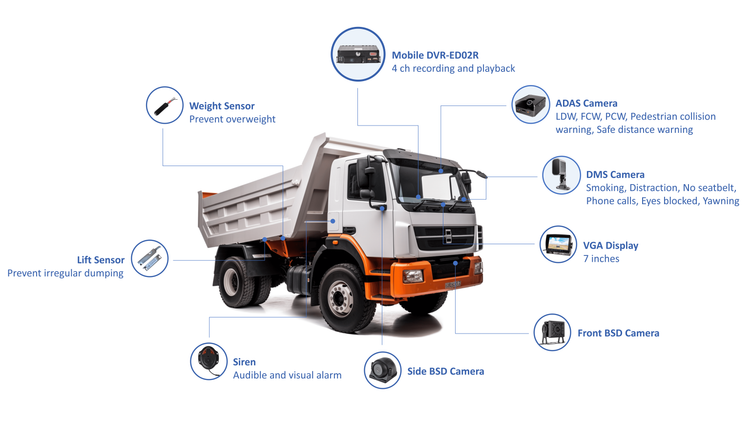
Problem: Too much footage, too little sense
Folks running trucks keep getting buried in hours of dashcam footage and still don’t know which bits matter. The real trouble is sifting raw video into clear, usable signals for safer driving and smarter routing. If you manage vehicles, you need systems that turn that noise into straightforward answers—start with the basics of logistics fleet management and build from there.
What to track — the short list
Keep this list tight. Track these things first and you’ll cover the big safety and operational problems:
– Driver-critical events: hard braking, harsh acceleration, and aggressive cornering.
– Near-miss detections: sudden evasive maneuvers and rapid lane changes flagged by sensors.
– Intersection behavior: stops, roll-throughs, and red-light events with timestamps.
– Speed vs. limit context: vehicle speed plotted against road speed limits and GPS trace.
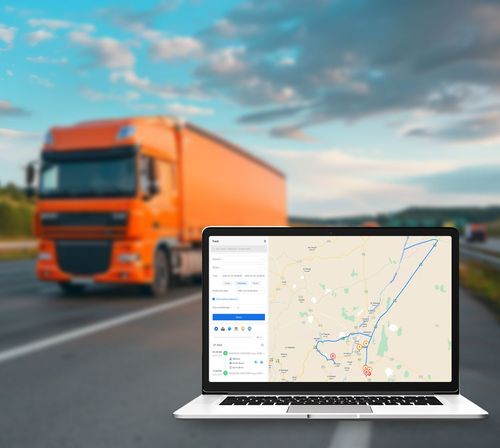
– Video clips with metadata: short clips tied to GPS, heading, time-of-day, and vehicle ID.
– Vehicle health signals: engine warnings and basic OBD summaries linked to events.
– Environmental context: weather flag and road type (highway, rural, urban) when available.
Why those things matter — a plain reasoned case
Every recorded event needs a purpose. Hard braking and near-miss clips point to risky routes or training gaps. Intersection faults show where routes or job schedules force hurried decisions. Speed context helps you judge whether drivers are routinely over the line or reacting to traffic. These are the actual fixes, not fancy dashboards.
How to collect and label so the data works
Record short clips around flagged events only. Tag clips with vehicle ID, driver shift, GPS coordinates, and event code. Use automated detection to cut down what humans must watch. Keep labels consistent: the same code for the same behavior every time. Train your system with representative examples—don’t feed it only perfect highway footage and expect it to spot rural roadside hazards.
Reporting that doesn’t waste time
Reports should answer two questions: what happened and what to do next. Make reports that list the top five repeat issues per week, each with a short clip, exact location, and suggested fix (route change, coaching, maintenance). Use simple thresholds: three similar events in 30 days equals a review. Show trends by driver and by route so the boss knows if it’s a person, a piece of road, or a scheduling problem.
Pitfalls to avoid
Common mistakes cost time and trust. Don’t save every second of video—storage and review become impossible. Don’t rely on a single metric; harsh braking alone isn’t always driver fault. Don’t ignore context: a paved highway and a muddy back road call for different judgments. If you skip clear retention rules and privacy notices, drivers will resist the tech.
Privacy, retention, and rules
Have a defined retention policy: keep triggered clips long enough for review and legal needs, purge routine footage sooner. Inform drivers about what’s recorded and how it’s used. Keep access tight—only safety managers and named supervisors should see raw clips. That prevents misuse and builds buy-in.
Choosing tech and vendors — practical checks
Ask vendors for real demo clips, not slides. Verify automated detection accuracy on the road types you run. Check that the vendor ties video to telematics cleanly and can export event lists with GPS and timestamps. Watch how the system performs around busy hubs—traffic volumes at places like the Port of Rotterdam expose weaknesses fast. Compare vendors by how they help you reduce repeat events, not by how many dashboard widgets they sell.
How to roll it out without wrecking things
Start small. Equip one route or a handful of drivers, collect 30–60 days of events, then fix the low-hanging fruit: bad intersections, altered schedules, simple coaching points. Use that early success to expand. Avoid a shotgun deployment that leaves managers swamped and drivers suspicious.
Common metrics that actually move the needle
Measure fewer, clearer things: repeat-event drivers (count), events per 10,000 miles (rate), time-to-review (hours), and corrective actions completed (yes/no). Tie each metric to a concrete action: coaching, route tweak, or maintenance work order.
Final thought — plain and useful
Start with clear problems, track only what answers those problems, and demand labeled clips tied to GPS and time. Keep reporting simple and fixable. That way the tech helps drivers and managers alike. Systems built this way are what you want, and firms like BSJ aim to shape that practical fit between camera, data, and useful action.